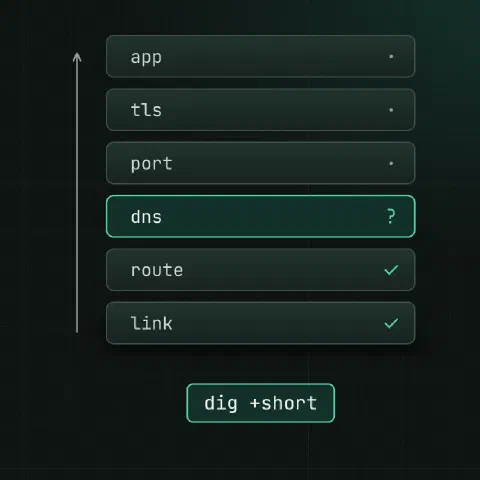
Work from the bottom up and stop at the first layer that fails.
Order of checks
| Layer | Question | Command |
|---|---|---|
| Link | Is the interface up with an address? | ip -br addr |
| Route | Do I know the way? | ip route get 203.0.113.10 |
| DNS | Does the name resolve correctly? | dig +short app.example.com |
| Reach | Do packets arrive? | ping -c3, mtr |
| Port | Is something listening and reachable? | nc -vz, ss -ltnp |
| TLS | Does the handshake work? | openssl s_client |
| App | Does it answer properly? | curl -v |
Interface, route
ip -br addr
ip -br link
ip route
ip route get 203.0.113.10               # which interface and gateway
ip neigh                                # ARP: FAILED means no answer at layer 2
ethtool eth0 | grep -E 'Speed|Duplex|Link'
DNS
dig app.example.com
dig +short app.example.com A
dig @1.1.1.1 app.example.com            # ask a specific resolver
dig +trace app.example.com              # follow delegation from the root
dig -x 203.0.113.10                     # reverse lookup
resolvectl status                       # which resolvers systemd-resolved uses
getent hosts app.example.com            # what the system resolver (and /etc/hosts) returns
dig asks DNS directly; getent goes through /etc/hosts and nsswitch like applications do. Different answers point to /etc/hosts or resolver config.
Reachability
ping -c3 203.0.113.10
mtr -rwbzc 50 203.0.113.10              # loss and latency per hop
tracepath 203.0.113.10                  # also finds the path MTU
ping -M do -s 1472 203.0.113.10         # does a 1500-byte packet fit?
Loss on a middle hop that doesn’t continue to the end is just a router rate-limiting ICMP.
Ports
ss -ltnp                                # TCP listeners and processes
ss -lunp                                # UDP
nc -vz 203.0.113.10 5432                # can I connect?
nc -vzu 203.0.113.10 53
timeout 3 bash -c '</dev/tcp/203.0.113.10/443' && echo open| Result | Usually means |
|---|---|
| Connection refused | Host reached, nothing listening on that port |
| Timeout | A firewall drops the packets, or wrong route |
| No route to host | Firewall REJECT, or ARP failure |
Listening on 127.0.0.1 only accepts local connections; 0.0.0.0 or [::] accepts all.
Firewall
nft list ruleset
iptables -S; iptables -L -n -v          # with packet counters
ufw status verbose
firewall-cmd --list-all
Watch the counters while you retry the connection; the rule whose counter rises is the one that matches.
TLS and HTTP
openssl s_client -connect app.example.com:443 -servername app.example.com </dev/null
curl -v https://app.example.com/
curl -sS -o /dev/null -w 'dns %{time_namelookup} connect %{time_connect} tls %{time_appconnect} total %{time_total}\n' https://app.example.com/
curl --resolve app.example.com:443:203.0.113.10 https://app.example.com/   # skip DNS
Capture packets
tcpdump -ni eth0 host 203.0.113.10 and port 443
tcpdump -ni any port 53                 # DNS queries and answers
tcpdump -ni eth0 'tcp[tcpflags] & (tcp-syn|tcp-rst) != 0'
tcpdump -ni eth0 -w capture.pcap port 5432      # open later in Wireshark
SYN out and nothing back: dropped on the way or at the far end. SYN out and RST back: the port is closed.
Keep in mind
- “It works from my laptop” tests a different source address, resolver and path. Test from the machine that fails.
- Check both directions: the reply path, a security group or a missing return route breaks as many connections as the forward one.
- MTU problems look like hangs on large transfers while small requests work; VPNs and tunnels are the usual cause.
Comments
Sign in with Google, GitHub or Facebook to comment.
Loading comments…