Reading ls -l
$ ls -l deploy.sh
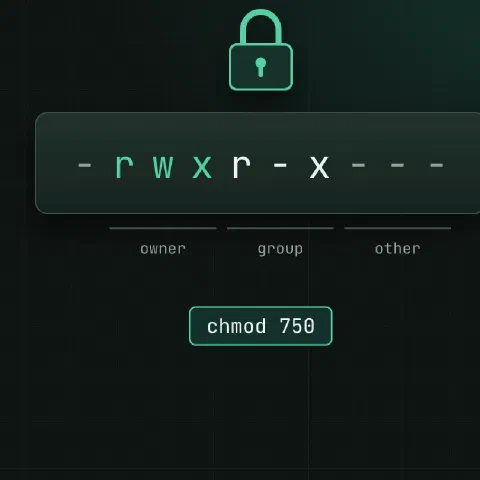
-rwxr-x--- 1 alice ops 812 Oct 20 10:12 deploy.sh
| Part | Meaning |
|---|---|
- | Type: - file, d directory, l symlink |
rwx | Owner (alice) can read, write, execute |
r-x | Group (ops) can read and execute |
--- | Everyone else: nothing |
On a directory, r lists names, w creates and deletes entries, x lets you enter it.
Octal values
Each digit adds read 4, write 2 and execute 1, for owner, group and others in that order.
| Digit | Permissions |
|---|---|
| 7 | rwx |
| 6 | rw- |
| 5 | r-x |
| 4 | r-- |
| 0 | --- |
| Mode | Typical use |
|---|---|
755 | Programs and directories |
644 | Normal files |
640 | Config readable by a group |
600 | Private keys, secrets |
700 | Private directories |
chmod
chmod 640 app.conf
chmod u+x deploy.sh
chmod g-w,o-rwx secrets.env
chmod -R u=rwX,go=rX /srv/www           # X: execute only on directories (and already executable files)
find /srv/www -type d -exec chmod 755 {} +
find /srv/www -type f -exec chmod 644 {} +
chmod --reference=good.conf bad.conf
Owners
chown alice:ops app.conf
chown -R www-data: /srv/www             # group = the user's primary group
chgrp ops deploy.sh
stat -c '%A %a %U:%G %n' app.conf       # mode, octal, owner, name
umask
| umask | New files | New directories |
|---|---|---|
022 | 644 | 755 |
027 | 640 | 750 |
077 | 600 | 700 |
umask                                   # current value
umask 027                               # this shell only
Set it for a service with UMask=0027 in its systemd unit.
Special bits
| Bit | On a file | On a directory | Octal |
|---|---|---|---|
setuid s | Runs as the file’s owner | Ignored | 4000 |
setgid s | Runs as the file’s group | New files inherit the group | 2000 |
sticky t | Ignored | Only the owner can delete their files | 1000 |
chmod g+s /srv/shared                   # shared team directory
chmod 1777 /scratch                     # like /tmp
find / -xdev -perm -4000 -type f 2>/dev/null    # setuid files: review this list
ACLs
setfacl -m u:alice:rw report.csv
setfacl -m g:ops:rx /srv/app
setfacl -d -m g:ops:rwX /srv/shared     # default ACL for new files
getfacl report.csv
setfacl -x u:alice report.csv           # remove one entry
setfacl -b report.csv                   # remove all
A + at the end of the mode in ls -l means the file has an ACL.
Attributes
chattr +i /etc/resolv.conf              # immutable: even root can't change it until chattr -i
chattr -i /etc/resolv.conf
chattr +a /var/log/audit.log            # append only
lsattr /etc/resolv.conf
Find problems
find / -xdev -type f -perm -0002 2>/dev/null     # world-writable files
find / -xdev -nouser -o -nogroup 2>/dev/null     # files with no owner
find /home -name '.ssh' -type d ! -perm 700
namei -l /srv/www/site/index.html                # permissions on every part of the path
sudo -u www-data test -r /srv/www/site/index.html && echo readable
Keep in mind
- “Permission denied” on a file you can read often means a parent directory lacks
x.namei -lshows which one. chmod -R 777fixes nothing and opens everything. Find the user the process runs as and grant that.- SSH refuses keys when
~/.sshor the key file is group- or world-writable.
Comments
Sign in with Google, GitHub or Facebook to comment.
Loading comments…