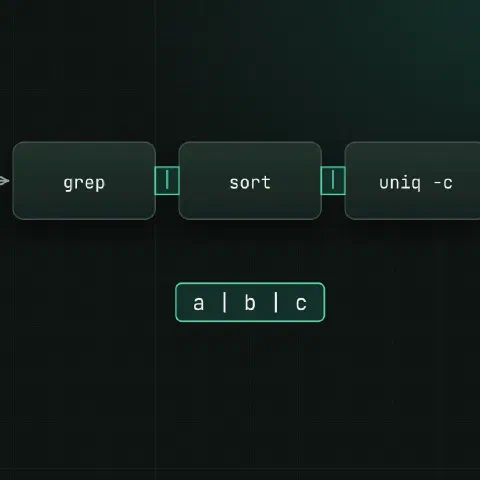
A pipe sends one command’s output into the next command’s input. Each command does one thing; the pipe joins them.
Syntax
| Syntax | What it does |
|---|---|
a | b | stdout of a into stdin of b |
a |& b | stdout and stderr into b (bash) |
a > file | stdout to a file, overwriting it |
a >> file | Append |
a 2> file | stderr to a file |
a > file 2>&1 | Both to the same file |
a 2>/dev/null | Drop errors |
a < file | Read stdin from a file |
a <<< "text" | A string as stdin |
diff <(a) <(b) | Command output as a file (process substitution) |
Order matters: > file 2>&1 sends both to the file; 2>&1 > file doesn’t.
Pipe helpers
| Command | Use in a pipe |
|---|---|
tee file | Save a copy and pass it on |
xargs | Turn input lines into arguments |
sort / uniq | Sort; drop or count duplicates |
head / tail | First or last lines |
wc -l | Count lines |
cut / awk | Pick columns |
tr | Swap or delete characters |
grep / sed | Filter and edit lines |
Old files
# list files older than 10 days
find /var/log/app -type f -mtime +10

# delete them: check the list above first
find /var/log/app -type f -mtime +10 -delete

# only *.log, and print what goes
find /var/log/app -type f -name '*.log' -mtime +10 -print -delete

# compress instead of deleting
find /var/log/app -type f -name '*.log' -mtime +10 -print0 | xargs -0 -r gzip

# remove empty directories left behind
find /var/log/app -mindepth 1 -type d -empty -delete
-mtime +10 means modified more than 10 full days ago. Use -mmin +60 for minutes.
Count and rank
# the classic: count each distinct line, most common first
sort file | uniq -c | sort -rn | head

# top client IPs in an access log
awk '{print $1}' access.log | sort | uniq -c | sort -rn | head -20

# errors per type
grep -oE 'ERROR [A-Za-z]+' app.log | sort | uniq -c | sort -rn

# HTTP status codes
awk '{print $9}' access.log | sort | uniq -c | sort -rn

# unique values only
cut -d, -f3 data.csv | sort -u

# lines that appear more than once
sort file | uniq -d
uniq only merges duplicates that sit next to each other, which is why sort always comes first.
Search and act
# files containing a string, then open or edit them
grep -rl 'old.example.com' /etc/nginx/ | xargs -r sed -i 's/old.example.com/new.example.com/g'

# safe with spaces in names
find . -name '*.tmp' -print0 | xargs -0 -r rm -f

# run in parallel, 4 at a time
find . -name '*.png' -print0 | xargs -0 -P4 -n1 optipng

# kill processes by name, after looking at them
pgrep -af 'python worker.py'
pgrep -f 'python worker.py' | xargs -r kill
xargs flags
| Flag | What it does |
|---|---|
-0 | Input is NUL-separated (pair with find -print0) |
-r | Don’t run at all on empty input |
-n1 | One argument per command |
-I{} | Put each line where {} is: xargs -I{} cp {} /backup/ |
-P4 | Four jobs at once |
-t | Print each command before running it |
Disk space
# biggest directories here
du -xh --max-depth=1 . 2>/dev/null | sort -rh | head

# biggest files on this filesystem
find / -xdev -type f -size +100M -printf '%s\t%p\n' 2>/dev/null | sort -rn | head | numfmt --to=iec --field=1

# deleted files still held open
lsof +L1 2>/dev/null | awk 'NR>1 {print $7, $1, $2, $NF}' | sort -rn | head
Logs live
tail -F app.log | grep --line-buffered ERROR
tail -F app.log | grep --line-buffered ERROR | tee errors.log
journalctl -u nginx -f | grep -v 'GET /health'
Without --line-buffered, grep holds output when it isn’t writing to a terminal, so the next command sees nothing for a while.
Text tricks
# lowercase
tr '[:upper:]' '[:lower:]' < in.txt

# one word per line, then word count
tr -s '[:space:]' '\n' < in.txt | sort | uniq -c | sort -rn | head

# join lines with commas
paste -sd, list.txt

# lines in a.txt that aren't in b.txt
comm -23 <(sort a.txt) <(sort b.txt)

# compare two servers' package lists
diff <(ssh [email protected] 'dpkg -l' | awk '{print $2}') \
     <(ssh [email protected] 'dpkg -l' | awk '{print $2}')
Pipes in scripts
set -o pipefail                         # a pipe fails if any part fails
curl -fsS https://example.com/data.json | jq .items > items.json

cmd1 | cmd2 | cmd3
echo "${PIPESTATUS[@]}"                 # exit code of each part (bash)

sudo tee /etc/app.conf > /dev/null <<< "key=value"   # write a root-owned file
sudo echo x > /etc/file fails because the redirect runs as you, not as root; sudo tee works.
Keep in mind
- Run the listing half of a delete pipeline first and read it, then add
-deleteorrm. cat file | grep xworks, butgrep x fileis one process less.- Each part of a pipe runs in a subshell, so
cmd | while read v; do n=$v; doneleavesnunset afterwards.
Related
- xargs cheat sheet: turn input into arguments
- sort and uniq cheat sheet: sorting, duplicates and ranking
- head and tail cheat sheet: first and last lines, following logs
- tee cheat sheet: saving output mid-pipe, sudo tee
- find cheat sheet: finding files by name, age and size
- grep cheat sheet: searching text
- sed cheat sheet: editing text in streams and files
- awk cheat sheet: columns, sums and reports
- regex cheat sheet: patterns for grep, sed and awk
- text processing one-liners: cut, tr, paste, comm and join
- Linux processes cheat sheet: ps, kill, signals and jobs
- Linux disks cheat sheet: df, du, mounts and LVM
- disk full cheat sheet: deleted open files, full inodes, hidden space
- /dev/null, /dev/zero and /dev/urandom: discarding output and random data
- Bash scripting cheat sheet: pipefail, traps and loops
- jq cheat sheet: JSON on the command line
- ssh cheat sheet: remote commands and tunnels
- systemctl cheat sheet: services, units and timers
- journalctl cheat sheet: reading and filtering logs
- curl cheat sheet: HTTP requests and APIs
Comments
Sign in with Google, GitHub or Facebook to comment.
Loading comments…