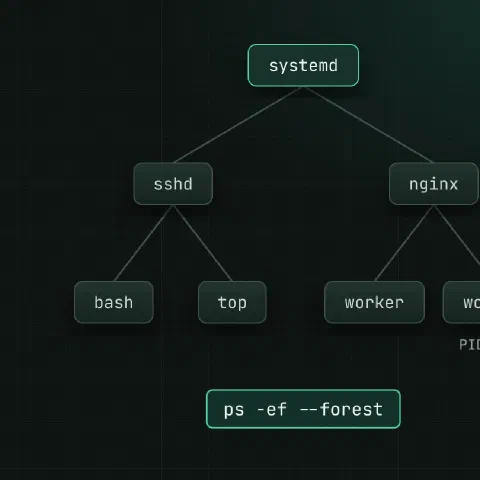
Find processes
ps aux                                  # everything, BSD style
ps -ef --forest                         # with the parent tree
ps -eo pid,ppid,user,%cpu,%mem,etime,cmd --sort=-%cpu | head
ps -o pid,stat,cmd -p 1234
pgrep -af nginx                         # PIDs and command lines
pidof nginx
pstree -p 1234
ps STAT codes
| Code | Meaning |
|---|---|
R | Running or runnable |
S | Sleeping, waiting for something |
D | Uninterruptible sleep, usually disk or NFS I/O |
Z | Zombie: finished, parent hasn’t collected it |
T | Stopped (Ctrl-Z or SIGSTOP) |
< / N | High / low priority |
s / + | Session leader / foreground group |
Many processes in D push the load average up without using CPU.
top keys
| Key | What it does |
|---|---|
P / M / T | Sort by CPU / memory / time |
1 | One line per CPU |
c | Full command lines |
H | Show threads |
u | Only one user’s processes |
k | Send a signal |
r | Renice |
htop does the same with a friendlier screen.
Signals
| Signal | Number (x86, ARM) | Default effect |
|---|---|---|
SIGHUP | 1 | Hang up; many daemons reload their config |
SIGINT | 2 | Interrupt (Ctrl-C) |
SIGQUIT | 3 | Quit and dump core (Ctrl-\) |
SIGKILL | 9 | Kill now; can’t be caught or ignored |
SIGTERM | 15 | Ask politely to stop (the default) |
SIGSTOP | 19 | Pause; can’t be caught |
SIGCONT | 18 | Resume |
SIGUSR1 | 10 | Program-defined (log reopen in nginx, for example) |
kill 1234                               # SIGTERM
kill -HUP 1234
kill -9 1234                            # last resort: no cleanup happens
pkill -f 'python worker.py'
killall -TERM nginx
kill -l                                 # list all signals
Jobs
long-task &                             # run in the background
jobs -l
fg %1
bg %1                                   # resume a Ctrl-Z'd job in the background
disown %1                               # keep it running after logout
nohup long-task > task.log 2>&1 &
setsid long-task                        # in a new session, detached from the terminal
For anything that must survive a reboot, write a systemd unit instead.
Priority
nice -n 10 tar -czf backup.tgz /data    # lower CPU priority (19 is lowest)
renice -n 5 -p 1234
ionice -c3 rsync -a /data /backup       # idle I/O class
ionice -c2 -n7 -p 1234                  # best effort, lowest
taskset -c 0,1 ./app                    # pin to CPUs 0 and 1
Look inside /proc
cat /proc/1234/status                   # state, memory, threads
tr '\0' ' ' < /proc/1234/cmdline; echo  # full command line
tr '\0' '\n' < /proc/1234/environ       # environment (root or owner)
ls -l /proc/1234/fd                     # open files
ls -l /proc/1234/cwd                    # working directory
cat /proc/1234/limits                   # ulimits
cat /proc/1234/io                       # bytes read and written
Other tools
lsof -p 1234                            # files and sockets it holds
strace -p 1234 -f -e trace=network      # what syscalls it makes
pmap -x 1234                            # memory map
timeout 30s ./slow-command              # kill it after 30 seconds
watch -n 2 'ps -eo pid,%cpu,cmd --sort=-%cpu | head'
Keep in mind
- Zombies can’t be killed; they’re already dead. Fix or restart the parent that isn’t reaping them.
- Send SIGTERM, wait a few seconds, then SIGKILL. A killed database or queue may need recovery on restart.
Related
- Linux pipes cheat sheet: redirects and chaining commands
- xargs cheat sheet: turn input into arguments
- systemctl cheat sheet: services, units and timers
Comments
Sign in with Google, GitHub or Facebook to comment.
Loading comments…